
How to Enroll in Your Group Insurance Plan
Enroll in your group insurance plan through your IntelliFlex® online account.
Note
What you see in your account may differ from the images shown on this page, depending on your plan.
Enroll in the plan
- Log in to the secure site. On the home page, select Your account, then the Enrollment and coverage link.
- The page that shows your IntelliFlex online file will open. On the Welcome to your online group insurance file page, select the I want to enroll button to finish enrolling.
Reviewing the profile information
Any time after you enroll in your plan, you can read over the information about you, your dependents and your beneficiaries.
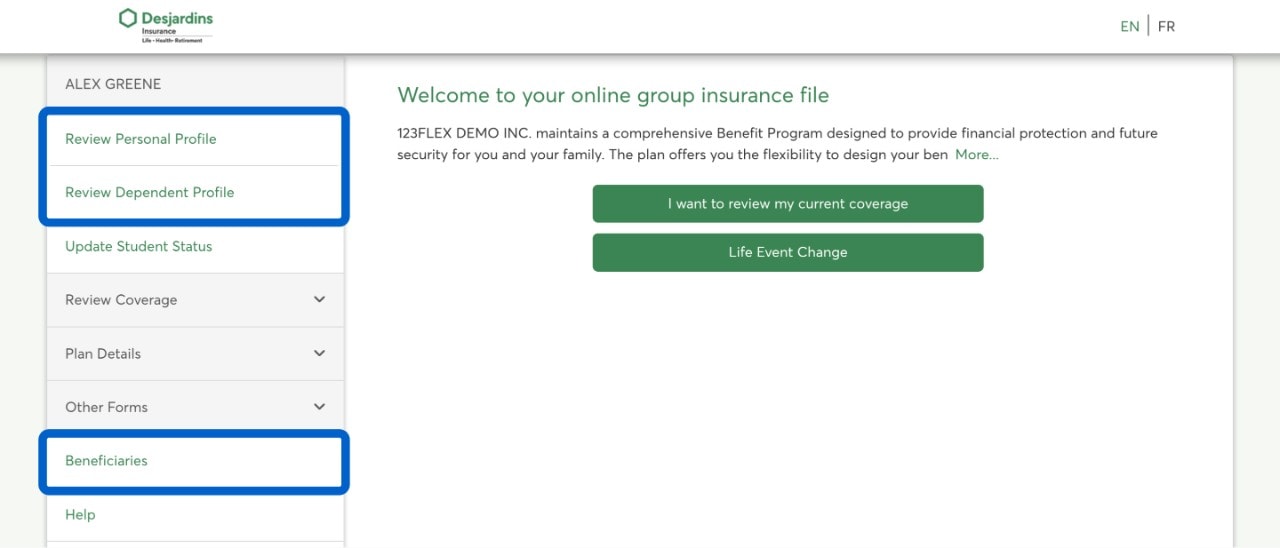
- Under Review Personal Profile, review your information and correct it if necessary.
- Under Review Dependent Profile, you can manage dependents on your group insurance plan.
- Under Beneficiaries, you can manage beneficiaries on your plan.
Selecting or changing your insurance options
After you review the information, you can select or change your insurance options. Simply select a benefit, then make any necessary updates.
Read over your insurance options carefully before saving them. Once you’re enrolled, you can only make changes if you experience an eligible life event.

After you enroll
It is possible to change your group insurance options or manage your dependents’ information once you’re enrolled in your plan, but only if you experience an eligible life event:
- Marriage or new common-law spouse
- Separation or divorce
- Birth, adoption of a child, return to school
- Loss or gain of a spouse’s coverage, for a reason other than personal choice
- Death of a dependent
- Termination of a dependent’s eligibility because of their age
You may also update your insurance details during a re-enrollment period. Contact your plan administrator for upcoming re-enrollment periods.
Call us
You'll need your group and certificate numbers.
Monday to Friday: 8 AM to 8 PM (Eastern Time)
1-800-263-1810 This link opens your phone app.